Service Call
 Managed Print

Essential Maintenance Tips for Sublimation Printers
Sublimation printers are powerful tools capable of creating vibrant, long-lasting prints. But like any precision printing equipment, they need proper care to perform at their best.
Without regular maintenance, even high-quality sublimation printers can suffer from clogged print heads, colour inconsistencies, and unexpected downtime.
All desktop printers, including sublimation printers, require some form of routine maintenance to ensure optimal performance and longevity. Regular maintenance can help prevent common problems from occurring, improve overall print quality, and extend the life of your printer.
Understanding How Sublimation Printers Work
Sublimation printing is different from other printing methods because it uses heat and pressure to turn inks into a gas that fuses with the printing medium. Instead of existing on top of paper or fabric, the design blends in with the medium, producing vivid, high-quality prints that are much less likely to fade or crack.
Dye sublimation printing requires specific types of ink, transfer paper, a heat press, and a specialised printer. This process works best with synthetics like polyester but can work far beyond fabric, allowing customisation on metal, ceramic, and even mouse pads.
The results are vibrant and long-lasting and won’t peel or fade, making them especially useful for artists. By understanding how sublimation printers work differently from other office and home printers, users will be able to take better care of their devices.
In this guide, we walk through some essential maintenance tips to help you prevent common issues, extend your printer’s lifespan, and keep your sublimation prints looking sharp and professional.
Essential Maintenance Tips for Sublimation Printers
In order to get the best results possible from your sublimation printer, some form of regular maintenance is required. Neglecting maintenance can result in poor print quality, clogged print heads, blank pages, and other issues that can affect the printer’s lifespan and performance.
Here are some essential maintenance tips for sublimation printers, including cleaning, troubleshooting, and maintenance.
Keep Your Printer Clean
Keeping your sublimation printer clean is an easy way to protect your device and preserve print quality. Regularly cleaning buildup, debris, and dust from the print heads, exterior, and ink cartridges will help keep your printer performing optimally and producing vibrant results.
Use High-quality Ink and Paper
Using high-quality ink cartridges and premium paper is crucial for achieving vibrant and accurate colours in your prints. Using cheap materials will only wreck your printer, so always be sure to use ink and paper recommended by your printer’s manufacturer and sold by authentic office suppliers.
Keep Your Printer in a Controlled Environment
Printers are extremely sensitive to environmental factors like heat and humidity, so try keeping your printer in a controlled environment like a home office or office supply room to help prevent any damage to the unit. Avoid exposing your printer to extreme temperatures or direct sunlight, too, to keep everything working as it should.
Keep Firmware Up to Date
Keeping your printer’s firmware up to date can help improve performance and fix any bugs or issues that may pop up. Check your printer’s manual for instructions on how to update the firmware, and be sure to keep your network settings turned on for added security.
Essential Cleaning Tips for Sublimation Printers
Cleaning is also a crucial part of taking care of your sublimation printer. Here are some essential tips for keeping your printer clean and running smoothly.
Clean the Print Heads
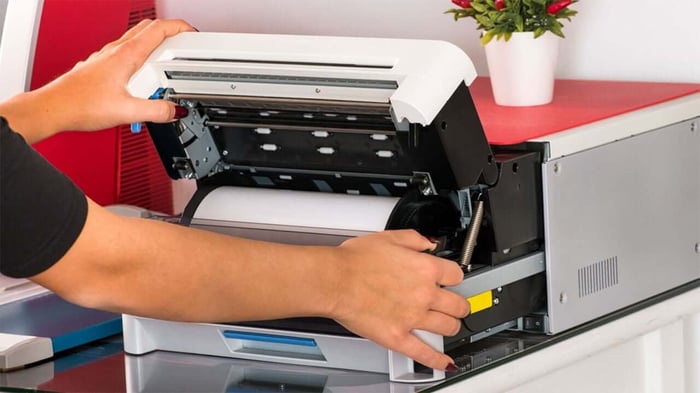
Print heads are the parts in your printer responsible for transferring ink onto the substrate, and over time, they can become clogged with dry ink and debris, leading to poor print quality. Some sublimation printers have a built-in print head cleaning kit that uses a special cleaning solution to unclog the parts. Be sure to check your printer’s manual to see if this option is available.
If the cleaning cycle does not resolve the issue, you may need to manually clean the print heads yourself. To do this, gently wipe the print heads with a lint-free cloth or paper towel soaked in cleaning solution. Be careful not to touch the nozzles or damage any components.
By keeping your print heads clean and unblocked, you protect your device and continue printing consistently.
Pro tip: If you own an all in one printer with sublimation functionality, be sure to clean out the print heads between different types of print jobs. Because sublimation printing uses different types of ink than inkjet and laser printing, you will need to clean out the parts before starting your next job.
Clean the Ink Cartridges
Cleaning your ink cartridges is an important part of regular sublimation printer maintenance. Check the cartridges regularly for clogs or dried ink buildup, and gently clean them with a soft cloth and cleaning solution.
Make sure the printer is turned off before removing the cartridges. To avoid damage, carefully follow the manufacturer's cleaning and handling instructions to ensure optimal print quality and extend your printer's life.
Clean the Printer Exterior
To help maintain your printer's appearance and functionality, include exterior cleaning in your regular maintenance. Make sure the printer is unplugged and turned off before using a gentle, lint-free cloth to clean the surfaces without using harsh chemicals.
Keep an eye out for dust in the vents and give them a gentle cleaning. Check for ink spills on a regular basis and use a slightly moist cloth for the control panel.
Keep Your Sublimation Printer Performing at Its Best
Maintaining your sublimation printer doesn’t have to be complicated — it just requires consistency! By keeping your printer clean, using high-quality products, and staying on top of routine maintenance, you can avoid common issues, protect print quality, and extend the life of your equipment.
If you’re looking for quality ink cartridges and paper and expert advice to keep your sublimation printer running smoothly, CartridgesDirect is here to help. Browse our online range of sublimation printers and office supplies, or get in touch with our team for guidance on the right products for your setup.
Invest in proper maintenance today and enjoy consistent, professional-quality sublimation prints for years to come.