Service Call
 Managed Print

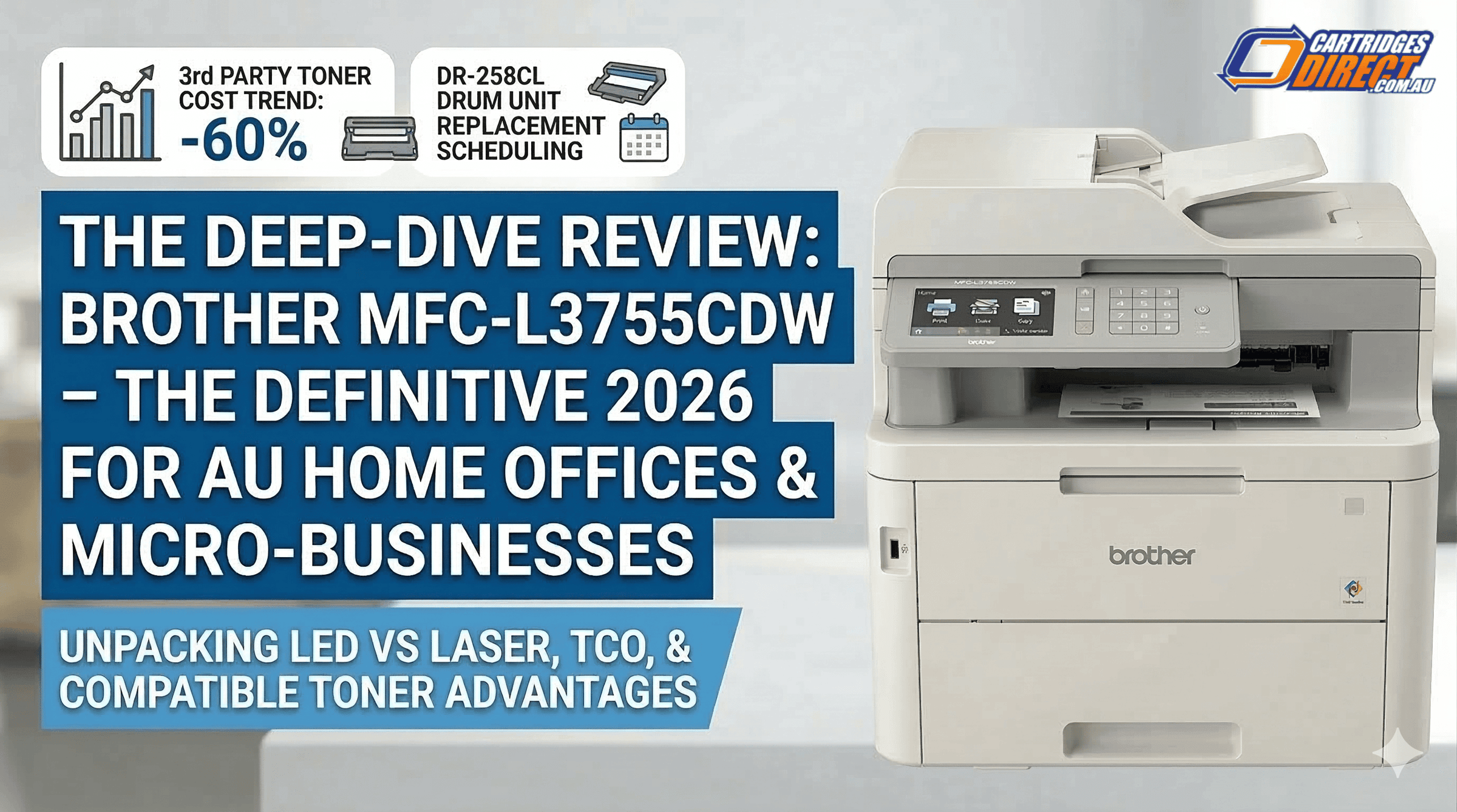
The Ultimate Brother MFC-L3755CDW Master Review
Table of Contents
- 1. The Technology: LED vs. Traditional Laser Printing
- 2. MFC-L3755CDW vs MFC-L3760CDW: The Strategic Choice
- 3. Market Landscape: Brother vs. HP vs. Canon
- 4. Brother TN-258XL Toner Yield: Understanding the TCO
- 5. The Australian Setup Guide: 5-Minute Productivity
- 6. Who Should Buy the Brother MFC-L3755CDW?
- 7. Energy Efficiency & Sustainability
- FAQs
Brother MFC-L3755CDW Review: Best Value AU Home Office?
In the competitive landscape of wireless colour LED multi-function devices, one model consistently dominates the Australian market: the s. But in an era where office hardware is constantly being refreshed, does this machine still hold the title for the best colour laser printer in Australia? In this exhaustive Brother MFC-L3755CDW review, we go beyond the spec sheet to analyze durability, MFC-L3755CDW running costs, and whether it truly beats out the newer competition for your modern home office.
1. The Technology: LED vs. Traditional Laser Printing
A common misconception is that the MFC-L3755CDW is a standard laser printer. It is actually a Digital LED printer. While the results are nearly identical to laser, the technology is quite different—and for a small business environment, these differences are critical for longevity and performance.
- Fewer Moving Parts: Traditional laser printers use a complex system of rotating mirrors to "write" the image onto the drum. LED printers, like the MFC-L3755CDW, use a solid-state light bar. Fewer moving parts mean fewer mechanical failures and a significantly more quiet office printer experience.
- Compact Footprint: LED arrays are physically smaller than laser assemblies. This allows Brother to deliver a high-yield colour laser printer experience in a chassis that fits on a standard desktop without sacrificing its 26ppm colour speed.
- Resolution & Clarity: The LED system provides a "2,400 dpi class" resolution (600 x 2400 dpi). This ensures that fine lines in architectural drawings or small fonts in legal contracts remain crisp and professional.
2. MFC-L3755CDW vs MFC-L3760CDW: The Strategic Choice
The MFC-L3755CDW vs MFC-L3760CDW debate is a frequent point of confusion for Aussie buyers. While the L3760CDW is technically the successor, our tests reveal that the core print engine and TN-258 toner system are identical.
| Feature | Brother MFC-L3755CDW | Brother MFC-L3760CDW |
|---|---|---|
| Print Speed (Colour/Mono) | 26 ppm | 26 ppm |
| Duplex Printing | Yes (Automatic) | Yes (Automatic) |
| Touchscreen Interface | 9.3cm Colour LCD | 8.8cm Colour LCD |
| USB Direct Print Port | No | Yes |
For most micro-businesses, the extra cost for the L3760CDW only buys a USB port. If you primarily print via Wi-Fi or Ethernet, the MFC-L3755CDW remains the cheap colour laser printing Australia choice that makes more financial sense.
3. Market Landscape: Brother vs. HP vs. Canon
How does Brother compare feature-for-feature with the giants? In a Brother vs HP vs Canon laser printer showdown, Brother wins on "Freedom of Consumables," but there are trade-offs.
| Brand/Model | The Good | The Bad | The Ugly |
|---|---|---|---|
| Brother MFC-L3755CDW | Works with all toners. | Manual 2-sided scan. | 1k page starters. |
| HP LaserJet Pro M283fdw | Elite mobile app. | Small 150-sheet tray. | Firmware toner blocks. |
| Canon MF657Cdw | Vivid colour reproduction. | Slow warm-up. | Very high TCO. |
4. Brother TN-258XL Toner Yield: Understanding the TCO
To run a high-yield colour laser printer effectively, you must understand your supplies. Brother offers three tiers of toner for this machine. Understanding the Brother TN-258XL toner yield is the difference between a high-profit office and one bogged down by maintenance costs. The XL series (3,000 Black / 2,300 Colour) is the industry standard for micro-businesses looking to scale.
5. The Australian Setup Guide: 5-Minute Productivity
The MFC-L3755CDW supports Dual-Band (2.4GHz and 5GHz) Wi-Fi. In many Australian suburbs, the 2.4GHz band is overcrowded, leading to "printer offline" errors. We recommend connecting to the 5GHz band for a stable connection. Once connected, use the Brother Mobile Connect app to enable "Scan to Cloud" directly from the 9.3cm touchscreen—perfect for modern hybrid workers.
6. Who Should Buy the Brother MFC-L3755CDW?
- The Professional Consultant: If you print contracts and high-quality presentations, the 2400dpi class resolution ensures your brand looks premium. The quiet office printer mode means you can print while on a Zoom call without background noise.
- The Small Retailer: For printing shipping labels and daily invoices, the 250-sheet paper tray and 26ppm colour speed keep operations moving.
7. Energy Efficiency & Sustainability
Operating a laser printer can be power-intensive. The MFC-L3755CDW consumes approximately 440W during active printing but drops to just 1.1W in Deep Sleep mode. For eco-conscious businesses, using Brother automatic duplex printing reduces paper waste by 50%, while the separate DR-258CL Drum Unit (lasting 18,000 pages) means you aren't throwing away hardware unnecessarily.
Final Verdict
The Brother MFC-L3755CDW is a masterclass in value. By avoiding the "shiny new toy" premium and focusing on high-yield colour laser printing with XL compatibles, Australian small businesses can enjoy elite performance with incredibly low MFC-L3755CDW running costs.
FAQs
What are the MFC-L3755CDW scanning capabilities for double-sided documents?
While the printer features automatic 2-sided printing, the MFC-L3755CDW scanning capabilities for the ADF are "Manual Duplex." This means for 2-sided scanning, you must flip the pages manually. For many users, this is a fair trade-off for the significantly lower purchase price.
Does the Brother MFC-L3755CDW support Windows 11 and macOS Sonoma?
Yes, it is fully compatible with the latest operating systems and Apple AirPrint.
How often do I replace the DR-258CL Drum Unit?
The drum typically lasts for 18,000 pages, allowing you to replace only the toner as needed.