Service Call
 Managed Print

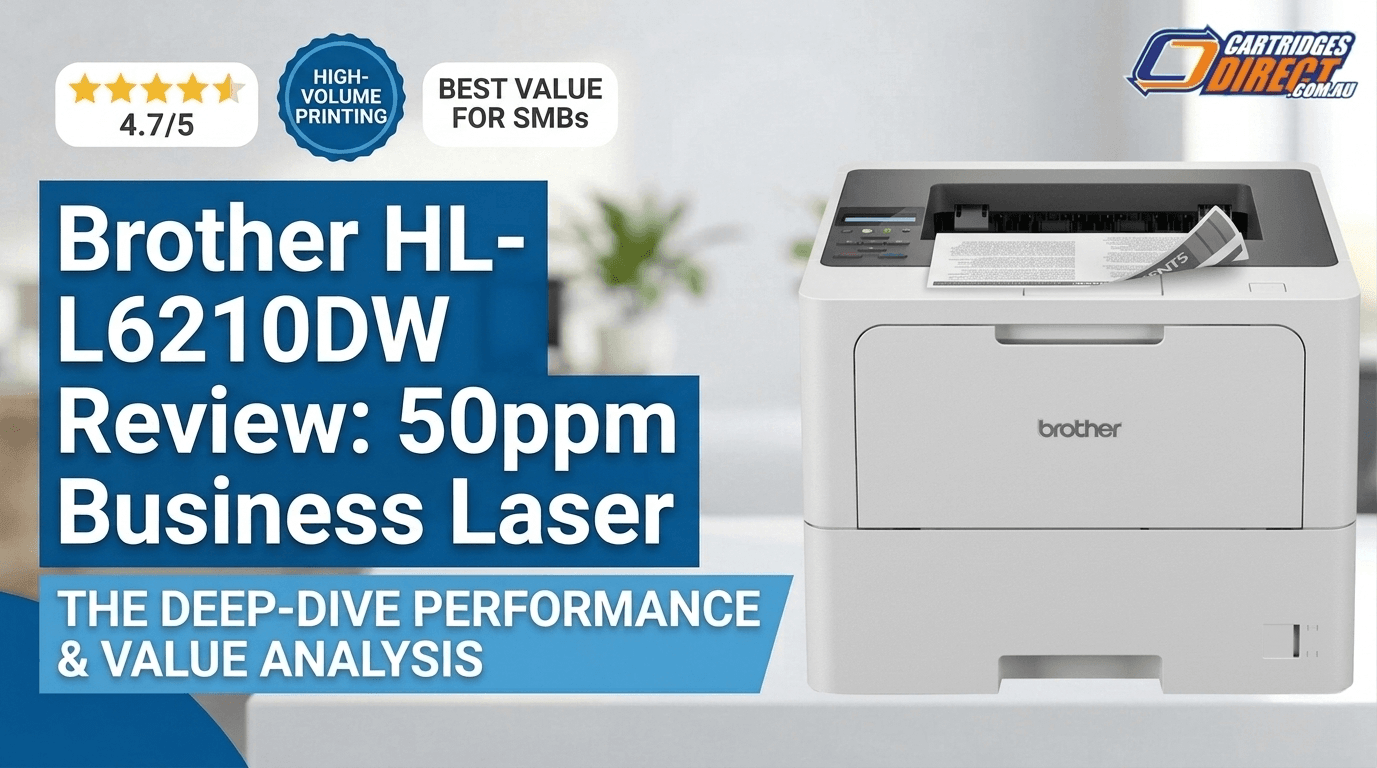
Brother HL-L6210DW Review Australia: 50ppm Business Laser
Table of Contents
- Who Is the Brother HL-L6210DW Built For?
- Key Specifications
- Print Speed and Quality
- Paper Handling and Capacity
- Connectivity and Setup
- Security Features
- Toner Cartridges and Running Costs
- Mobile and Cloud Printing
- Verdict: Is the Brother HL-L6210DW Worth It?
- Buy the Brother HL-L6210DW at CartridgesDirect
- FAQs
Brother HL-L6210DW Review Australia: 50ppm Business Laser
If your office is churning through documents and you're tired of slow print speeds, paper jams, and sky-high running costs, this Brother HL-L6210DW review Australia has everything you need. This mono laser printer hits 50 pages per minute, auto duplexes, supports wireless and gigabit Ethernet, and delivers a cost per page as low as 1.1 cents with the right toner. It's a straightforward, high-performance machine built to keep up with demanding print environments — without a premium price tag.
Below, we break down everything Australian buyers need to know: performance, paper handling, connectivity, running costs, toner options, and the optional accessories worth considering.
Who Is the Brother HL-L6210DW Built For?
Based on this Brother HL-L6210DW review, Australia's small and medium businesses will find it sits firmly in the workgroup laser printer category — not a budget home device, not an enterprise behemoth. It's the right fit for:
- Small to medium businesses with 5–20 users sharing a network printer
- Legal, accounting, and medical practices that print high volumes of black-and-white documents
- Home offices or remote workers who need a fast, reliable machine that won't let them down under pressure
- IT managers looking for low-maintenance, network-ready hardware with solid security credentials
If you regularly print more than 500 pages a week and need consistent results without constantly babysitting the machine, this printer was built with you in mind.
Key Specifications
| Print Speed | Up to 50ppm (A4 mono) |
| Print Resolution | Up to 1200 x 1200 dpi |
| Memory | 256MB |
| Standard Paper Capacity | 520-sheet tray + 100-sheet multi-purpose tray |
| Max Paper Capacity | Up to 1,660 sheets (with optional trays) |
| Duplex Printing | Automatic (built-in) |
| Connectivity | Gigabit Ethernet, 2.4/5GHz Wi-Fi, Wi-Fi Direct, Hi-Speed USB 2.0 |
| Mobile Printing | AirPrint, Mopria, Brother Mobile Connect |
| Monthly Duty Cycle | Up to 50,000 pages (recommended: 5,000) |
| Security | Triple Layer Security |
| Compatible Toners | TN-3605, TN-3605XL, TN-3615 |
| Optional Paper Tray | LT-6505 (520-sheet capacity) |
Print Speed and Quality
At 50 pages per minute, the HL-L6210DW is one of the fastest mono laser printers available in its class in Australia. First page out time is approximately 6 seconds from ready mode — quick enough that you won't find yourself hovering at the printer waiting. A five-page document lands in roughly 12 seconds.
Print quality is sharp and consistent. With a resolution of up to 1200 x 1200 dpi, text documents come out crisp and professional. Whether you're printing contracts, reports, invoices, or multi-page proposals, the output is clean and clear. Graphics and charts render well too — detail holds up even at smaller sizes. It won't replace a dedicated graphics printer for image-heavy marketing material, but for the everyday business printing it's designed for, results are excellent.
The built-in automatic duplex printing (double-sided) is smooth and reliable. Two-sided output is an easy way to halve your paper costs and reduce waste — something high-volume offices will notice quickly on the budget.
Paper Handling and Capacity
Standard Paper Handling
Out of the box, the HL-L6210DW ships with a 520-sheet main paper tray and a 100-sheet multi-purpose tray — a combined 620-sheet capacity that handles a comfortable week of moderate office printing without a refill. The multi-purpose tray is particularly useful for letterheads, envelopes, or heavier stocks that don't belong mixed in the main tray.
The printer handles paper from 60 to 163 gsm, covering standard 80gsm office paper through to thicker documents and card stock. A4 is the primary format, though it supports a range of media sizes including Legal, Letter, Executive, Folio, B5, and A5.
Optional Paper Tray: LT-6505
For offices with higher daily print volumes, the LT-6505 Optional Lower Paper Tray is a practical upgrade. Each LT-6505 adds a further 520 sheets of capacity, and you can stack up to two additional trays — pushing total input capacity to 1,660 sheets.
That's enough paper to get through a full week of high-volume output without manually topping up the tray. For a shared office printer, this is a meaningful quality-of-life improvement. It also allows you to load different paper types or sizes across trays and switch between them as needed — handy for practices that regularly print on both standard and letterhead stock.
The LT-6505 slots under the printer cleanly and integrates seamlessly with the HL-L6210DW's paper management. If you're purchasing this printer for a workgroup environment, factoring in one or two LT-6505 trays from the outset is worth considering.
👉 View the Brother HL-L6210DW and accessories at CartridgesDirect
Connectivity and Setup
The HL-L6210DW covers all the connectivity bases a modern office expects. Networking options include:
- Gigabit Ethernet — for wired network environments where speed and stability are non-negotiable
- 2.4GHz / 5GHz Dual-Band Wi-Fi — for flexible wireless placement in the office without signal compromise
- Wi-Fi Direct — for direct device-to-printer printing without needing to route through a network
- Hi-Speed USB 2.0 — for direct local connections
For mobile printing, it supports AirPrint (Apple devices), Mopria (Android), and the Brother Mobile Connect app — covering virtually every device that's likely to exist in your office.
The initial Wi-Fi setup process is not as slick as some competitors, but once connected, the printer maintains a reliable wireless connection. For most businesses, wired Gigabit Ethernet is the recommended setup for shared printing environments — it's faster, more stable, and simpler to manage.
Security Features
Security is an often-overlooked consideration when choosing an office printer. The HL-L6210DW addresses this with Triple Layer Security — Brother's framework covering:
- Network security — protects against unauthorised access to the printer over the network
- Device security — controls access at the machine level
- Document security — safeguards sensitive print jobs and stored data
For industries handling confidential information — legal, financial services, healthcare, government — this is more than a nice-to-have. It gives IT administrators the tools to maintain compliance and reduce the risk of data exposure through the print infrastructure.
Toner Cartridges and Running Costs
Running costs are where the HL-L6210DW really earns its keep. The printer is compatible with three genuine Brother toner cartridges, giving you flexibility to match your toner spend to your actual print volume:
TN-3605 — Standard Yield (~3,000 pages)
The standard yield option is suited to lower-volume users or as a starter cartridge. It's the lowest upfront outlay but the highest cost per page of the three options. For occasional use, it's a reasonable choice — though most business users will find themselves upgrading quickly.
👉 Shop Brother TN3605 Toner Cart at CartridgesDirect
TN-3605XL — High Yield (~6,000 pages)
Double the page yield of the standard cartridge, the TN-3605XL is a sensible step up for offices printing consistently throughout the week. The higher volume cartridge reduces the frequency of replacements and lowers cost per page — a better all-round value proposition for regular printing environments.
👉 Shop Brother Genuine TN3605XL Toner Cartridges at CartridgesDirect
TN-3615 — Ultra High Yield (~18,000 pages)
This is the toner choice for serious high-volume printing. At approximately 18,000 pages per cartridge, the TN-3615 brings the cost per page down to as low as 1.1 cents — a figure that competes with tank-based inkjet printers on running costs, while delivering the consistency and quality of a laser. For businesses regularly exceeding 1,000 pages per week, the TN-3615 is the smart long-term investment.
👉 Shop Brother TN-3615 Black Toner Cartridges - Genuine at CartridgesDirect
All three cartridges are genuine Brother products, available in Australia through CartridgesDirect with fast shipping nationwide.
Mobile and Cloud Printing
Modern offices don't always print from a desktop PC. The HL-L6210DW supports a full range of mobile and cloud printing workflows:
- Apple AirPrint — print directly from iPhone, iPad, or Mac with no drivers required
- Mopria Print Service — wireless printing from Android devices
- Brother Mobile Connect App — iOS and Android app for managing print jobs, checking toner levels, and configuring printer settings from your phone
For businesses where staff regularly move between devices or print from their phones, this level of mobile support is genuinely useful rather than just a marketing bullet point.
Verdict: Is the Brother HL-L6210DW Worth It?
For the right buyer, the answer is straightforwardly yes. As this Brother HL-L6210DW review Australia confirms, it delivers a compelling combination of speed, reliability, and low running costs that few mono laser printers at this price point can match locally.
The 50ppm print speed handles high-volume environments without breaking a sweat. Auto duplex, gigabit Ethernet, dual-band Wi-Fi, and broad mobile printing support cover every connectivity scenario a typical office will face. The paper capacity — particularly when expanded with optional LT-6505 trays — means less time topping up paper and more time getting work done. And with the TN-3615 ultra high yield toner bringing cost per page down to 1.1 cents, the long-term running costs are genuinely competitive.
There are minor trade-offs: initial Wi-Fi setup can take a little more effort than ideal, and the output tray capacity is modest. But these are small concessions in an otherwise strong package.
If you're looking for a fast, secure, cost-effective mono laser printer for a busy Australian office, the HL-L6210DW belongs on your shortlist.
Buy the Brother HL-L6210DW at CartridgesDirect
CartridgesDirect stocks the Brother HL-L6210DW along with the full range of compatible toners (TN-3605, TN-3605XL, TN-3615) and the LT-6505 optional paper tray. Australia-wide delivery with free shipping on orders over $75.
View the Brother HL-L6210DW at CartridgesDirect →
Shop all Brother toner cartridges at CartridgesDirect →
FAQs
Can I expand the paper capacity of the Brother HL-L6210DW?
Yes. Out of the box you get a 520-sheet main tray plus a 100-sheet multi-purpose tray. You can add up to two LT-6505 optional lower paper trays (520 sheets each), pushing total capacity to 1,660 sheets. The LT-6505 is available as an optional accessory from CartridgesDirect.
Does the Brother HL-L6210DW support wireless printing?
Yes. The printer supports dual-band Wi-Fi (2.4GHz and 5GHz), Wi-Fi Direct, Gigabit Ethernet, and Hi-Speed USB 2.0. It is compatible with AirPrint (Apple), Mopria (Android), and the Brother Mobile Connect app.
Can I print from my phone with the Brother HL-L6210DW?
Yes. The HL-L6210DW supports AirPrint for iPhone and iPad, Mopria for Android devices, and the Brother Mobile Connect app for both platforms. You can send print jobs wirelessly from your phone without needing a computer.
What is the difference between the TN-3605, TN-3605XL, and TN-3615 toner cartridges?
All three are genuine Brother toners compatible with the HL-L6210DW — the difference is page yield and cost per page. The TN-3605 is standard yield at approximately 3,000 pages. The TN-3605XL is high yield at around 6,000 pages. The TN-3615 is ultra high yield at approximately 18,000 pages and offers the lowest cost per page at around 1.1 cents — making it the best value for high-volume offices.
What is the monthly duty cycle of the Brother HL-L6210DW?
The HL-L6210DW has a maximum monthly duty cycle of up to 50,000 pages. Brother recommends a target monthly print volume of around 5,000 pages for sustained reliability and longevity.